Animation has proven to be a major attention-grabber for users. Whether it is transition animation, or same-state animation, UI designers are always trying to utilize it. A thing to consider during animation or visualization is preattentive features. Preattentive features are those aspects of a visual presentation that our iconic memory picks up, like color, size, orientation, and placement on page. In other words, they are any attribute “which is processed in spatial memory without our conscious action. In essence it takes less than 500 milliseconds for the eye and the brain to process a preattentive property of any image”[1]. I had a chance to work on a project where we had to evaluate some visual animations/attributes to check if they are preattentive or not.
The two attributes I chose to test are speed (slow/fast) and motion direction (clockwise, counter clockwise). A small full circle would move in a circular path as shown in the following image. The small circle moves clockwise or counter clockwise, in two speeds.

If you are not familiar with evaluation of user interfaces experiments, experiments are divided into blocks, each block has a number of trials. We had 6 participants, and 4 blocks, each had 12 trials, totaling in 48 trials per user, or 288 trials total.
The setup was as follows: the user would see a grid of 4, 9, 16, or 25 items, in which one of the items is different in one attribute of speed and direction, or both. So imagine you are seeing 4 circles, in which all small circles are moving in the same direction, except one, moving in the opposite direction. You then have to press space when you find that different circle, and then click on it. We measure the duration between showing the items and pressing space as the dependent variable in the experiment for each trial.
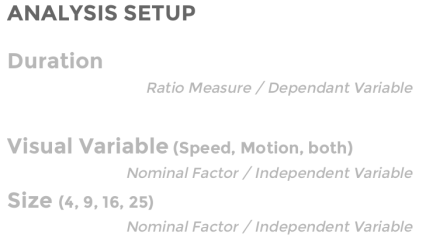
For a variable to be preattentive, duration should be almost constant independent of the number of items show; as the preattentive visual variable grabs our attention first unconsciously, and we are able to find it with no effort or thinking. That was our hypotheses: Both speed and direction combination is preattentive, meaning a user would be able to find the different circle in both speed and direction almost in a constant time for all grid sizes.

We ran the experiment with the 6 participants, and out of 288 trials, the users got the right answer (they picked the right different circle) 274 times.


The combined graph is show below:
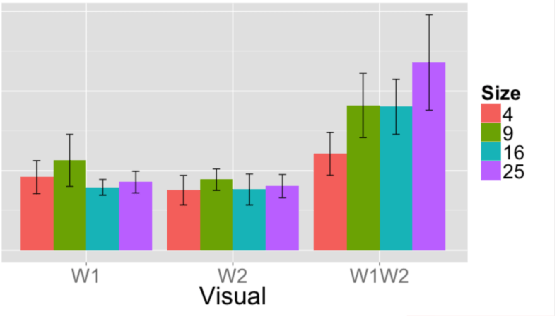
After regression of the time function in respect to size and variables, we go the following:

On preattentive variables, the lines should almost be constant. As you can see, the change in both visual variables causes increase in duration with size. Changes in any of the variables (speed or direction) separately causes an almost constant value. We had to reject the hypotheses we assumed at the beginning, but we found out that each of the variables separately is preattentive.
[1] Preattentive Visual Properties and How to Use Them in Information Visualization
 Engineering The Design